Release notes
VPL 4.4.2
VPL 4.4.2 is a maintenance release for the 4.4 branch. It focuses on bug fixes and user-interface improvements.
Bug Fixes 4.4.2
Added the missing require_once for the vpl_submission_CE class in the privacy provider.
Fixed default evaluator BIOTES output handling: after process termination, all pending output is now correctly read.
Removed the mix of annotations and file auto-links when teachers view submissions with both automatic and custom evaluation. Only custom annotations are now shown.
The Test cases and Execution files pages now display a link to BIOTES when the default evaluator is used.
Updated the Java run script to automatically detect the Java version when searching for the class containing the main() method, including support for the new Java 25 format.
Enhancements 4.4.2
The activity description page now shows which evaluator is used when it is not the default one.
The activity description page now displays the available Run and Debug actions, including custom scripts, reflecting the actual activity behavior.
The execution options page now includes information about custom scripts to reflect the real activity behavior.
It is now possible to change the maximum grade of an activity after submissions have been graded, with an option to rescale existing grades.
Improved the uninstall process to remove as much VPL-related data as possible, even if errors occur.
Enhanced binary file detection.
Added support for playing audio and video files in the editor and when viewing submissions.
VPL 4.4.1
VPL 4.4.1 is a maintenance release for the 4.4 branch and focuses on restoring functionality lost due to previous refactoring.
Fixes 4.4.1
Restored the ability to access and reuse previous grading comments while manually assessing a student submission.
Fixed regression from module refactor that prevented showing/hiding detailed grading comments ([+] / [-]) in grading reports.
Fixed a regression that displayed incorrect numbers of submissions (graded and ungraded) when using filters in the submissions page.
VPL 4.4.0
VPL 4.4.0 introduces a range of enhancements, fixes, and new features, focusing on improved usability and full compatibility with Moodle 5.1. This release also includes important internal refactoring to comply with Moodle’s coding style and code-checking requirements.
Enhancements 4.4.0
- Updated Third-Party Libraries:
Ace Editor: Updated from version 1.4 to 1.43.
noVNC Client: Updated to the latest version.
Text Terminal Client: Replaced term.js with Xterm.js, providing improved terminal emulation, support for non-Latin character input, and dynamic screen resizing.
Support for Course Overview: VPL now supports the new Course Overview feature in Moodle 5. The “Virtual Programming Labs” option also lets users access all VPL activities on a single page with advanced filtering.
Support for Subsections: The “Virtual Programming Labs” option now respects subsection structures (introduced in Moodle 5), displaying activities in the order they appear within the course.
Evaluator Help Links: The Execution Options, Cases Editor, and Execution Files Editor pages now include direct links to the relevant evaluator’s documentation.
- Miscellaneous Improvements:
GIOTES Regex Output Check: Now correctly interprets
\n,\r,\t, and\\.Dates: Added support for displaying “Available From” and “Due Date” on the course page.
Submission Status: Now respects group selection.
File Renaming: The editor now supports renaming files when only character case changes.
C++ 20 ISO Support: Added an option to use the C++ 20 ISO standard.
Page Size Preference: The selected page size is now remembered for the user’s session.
Fixes 4.4.0
Evaluator of Evaluations: The evaluator used in evaluation actions within execution files now works with any evaluator type.
Files for Cases: Ensures the use of the evaluator files needed for setting cases.
Clipboard in noVNC: Clipboard receiving now functions properly in the noVNC client.
Student Name Display: Fixed an issue that prevented proper display of student names in the menu options.
Compatibility 4.4.0
Moodle: Versions 4.1 to 5.1.
PHP: Versions 7.4 to 8.3.
VPL 4.3.2
VPL 4.3.2 resolves issues introduced by new features in the previous version and modifies many code files to fulfill Moodle’s code check requirements.
Fixes 4.3.2
Fixed downloading submission reports for team-based activities.
Corrected memory size display to “3.50 GiB”.
Reverted unintended course enrollment requirement for web services (from 4.2.4).
Fixed language string usage in scripts and locale detection.
Fixed Prolog script swipl version detection and GHDL entity detection.
Resolved MathJax rendering issues in activity descriptions.
Improved SEB compatibility with VNC mode.
Fixed performance issues in regex evaluation result parsing.
Fixed unnecessary execution scripts added to run/debug (from 4.3.0).
Fixed syntax highlighting outside editor (from 4.3.0).
Fixed syntax error in PHP run script (from 4.3.0).
Fixed “Run All languages” process to ignore new run modes.
Improved R language run script.
Compatibility 4.3.2
Moodle: Versions 4.1 and 4.4 to 5.0.
PHP: Versions 7.4 to 8.3.
VPL 4.3.1
This release introduces significant enhancements, fixes, and new features, with a focus on improved usability, extensibility, and compatibility with Moodle 5.
Highlights & Enhancements 4.3.1
Capabilities: New capability mod/vpl:editothersgrades allows users with appropriate roles to delete grades assigned by other teachers.
- Submissions List Report: Filtered and optimized (Rebuilt).
Standard user selection via initials.
Optimized multi-user evaluation.
Pagination support.
Download of filtered report data.
Activity Submission Summary: New summary panel in activity description and submissions list showing counts and status.
Editor: Support for OCaml, LaTeX, Makefile, reStructuredText. Improved hard tab handling.
- New Language/Tool Support:
C# (via Mono), COBOL.
Python Tutor integration for Python, C, C++, Java.
Plain Web Submissions: Improved ZIP archive support and error recovery (Contributed by Astor Bizard).
Advanced Grading: Support for advanced grading methods and enhanced grading form (Contributed by Astor Bizard).
“Based On” Usability: Teachers can view concatenated execution scripts and clarify inherited/overridden limits (Contributed by Astor Bizard).
Course Reset: Time Shifting, Granular Reset, optimized DB access, and Calendar Sync.
Activity logs: Tracks Save, Run, Debug actions per user.
Evaluator Subplugin Framework: New architecture for evaluator extensions. First implementation: GIOTES (enhanced I/O testing).
Run Mode Selection: Configurable run modes (Text, GUI, Web App, Text-in-GUI). Selectable globally or via annotations in source code (@vpl_run_text_mode, etc.).
GUI Evaluation: Supports evaluation of graphical programs using text-based inputs.
Fixes 4.3.1
Fixed downloading submission reports for team-based activities.
Corrected memory size display.
Reverted capability check changes requiring course enrollment for web services.
Various script fixes (Prolog, VHPL/GHDL).
MathJax rendering fixes.
SEB compatibility improvements.
Regex performance enhancements.
VPL 4.2.5
This update focuses on compatibility with Moodle 4.5.
Improvements 4.2.5
- Execution Scripts:
Added C# execution script with NUnit support.
Added execution scripts for the “make” tool.
Improved R script execution performance in evaluation mode.
Enhanced automatic detection of tools beyond programming languages.
Overrides: Enhanced the interface to allow copying an override as a base for creating a new one.
Error Handling: Improved error handling for Jail server connection issues.
Security: Set default behavior to reject invalid HTTPS certificates.
Bugfixes 4.2.5
Display Fixes: Resolved fixed-width font usage in “Compilation” and “Execution” panes.
Multi-User Overrides: Fixed management of multi-user overrides.
Compatibility 4.2.5
Moodle: 3.9 to 4.5.
PHP: 7.4 to 8.3.
VPL 4.2.4
This release addresses various issues found in version 4.2.3, including critical security fixes.
Bugfixes 4.2.4
Critical security flaw: Fixed a flaw affecting versions prior to 4.2.4. Updating VPL and VPL Jail Servers is strongly recommended.
Variations: Fixed running tests of test with variations.
Hide/show content: Fixed malfunction.
HTML overconversion: Fixed issue in VPL activity reports.
Highlighting: Fixed code file highlighting and result processing with multiple submissions on the same page.
Task identification: Fixed incorrect stopping of tasks.
Custom evaluation: Fixed bug removing custom vpl_evaluate.cpp.
Numeric testing: Fixed output testing of type numbers.
Fonts: Fixed CSS bug preventing monospace fonts in compilation/execution.
Interface Enhancements 4.2.4
Hide/show icon: Show cursor pointer on hover.
Hide grade form: Hidden if activity is not gradable.
Bulk removal of automatic evaluation: Running “evaluate all” now removes previous automatic grading if automatic evaluation is unset.
Evaluation tags: Parser now accepts spaces around evaluation report tags.
Environment variables: Added MOODLE_ACTIVITY_ID.
Capabilities: Aligned assignments with standard modules.
Integration Enhancements 4.2.4
Node.js: Added support for global modules.
Compatibility: Moodle 3.9 to 4.4, PHP 7.4 to 8.3.
VPL 4.2.3
Bugfixes 4.2.3
Directory Name Change: Fixed editing directory names in the editor.
Activities Listing: Fixed filtering error by section.
cmidnumber: Resolved modification bug.
Similarity Report: Fixed line processing in generic tokenizer.
Diff comparator: Limited memory usage.
Grade Value: Fixed handling of non-numeric grade values.
Interface Enhancements 4.2.3
Activity Description: Incorporated into “Required files”, “Execution files”, and “Cases file” editor.
Password Override: Overrides now include activity password activity.
Graders Access: Removed network and SEB restrictions for graders.
SEB Configuration Key: Implemented key verification.
SEB Keys Display: Passwords and SEB keys shown on activity info page.
Reports: Added “Virtual Programming Labs” report to the course report submenu.
Integration Enhancements 4.2.3
Language Support: Added C#, F#, and VisualBasic using dotnet.
Jail’s URL: Improved port processing for complex networks.
Student Comments: Added field in externallib.
Testing: Removed echo input during tests.
LC_ALL: Optimized environment variable configuration.
VPL 4.2.2
This release is a bugfix update for version 4.2.1 of the Virtual Programming Lab (VPL) for Moodle.
Bugfixes 4.2.2
ID number and Grade Calculation: Fixed a bug where the “ID number” of the course module was replaced by the course module ID. This previously prevented proper assignment of names to VPL activities for grade calculation formulas.
Improved access control checks: Access control has been enhanced to include checks for user enrollment in the course, ensuring more secure access to VPL activities.
get_name_fields(): Fixed an issue related to the deprecated get_all_user_name_fields() function. VPL now utilizes \core_user\fields::get_name_fields() if available, while maintaining compatibility.
Compatibility 4.2.2
Moodle: Versions 3.9 to 4.3.
PHP: Versions 7.4 to 8.1.
Known issues 4.2.2
JQuery-UI and Boost Theme Incompatibility: VPL utilizes JQuery-UI for its editor interface, which may be incompatible with the Boost theme in certain scenarios (e.g., toggling drawers).
VPL 4.2.1
This release is primarily a bugfix update for version 4.2.0, with several enhancements.
Improvements 4.2.1
Rust Support: Introduced support for the Rust programming language, including running, debugging, evaluating, and syntax highlighting.
Fullscreen Experience: Refined the mechanism for transitioning to fullscreen mode in the VPL IDE, enhancing compatibility with other Moodle themes.
Enhanced Automatic Evaluation: The “Testing Tests” feature within “Execution Files” now generates a unified report accessible from the comments panel, offering a more organized presentation.
Directory Rename: Enabled directory renaming within the editor environment through double-clicking on the directory in the file list panel.
PHP Similarity Engine: The system will employ the C++ similarity engine for processing PHP files.
Bugfixes 4.2.1
Debugging: Fixed run script not being sent during debugging, enabling debugging for C/C++.
Checkall Button: Removed the “Checkall” button when the user lacks necessary permissions.
Evaluation Results: Resolved a bug preventing retrieval of evaluation results in “Execution files” tests.
Localization: Added missing internationalization (i18n) strings.
Tokenizer Engine: Corrected and enhanced the performance of the VPL tokenizer engine.
VPL 4.2.0
This update brings enhanced user functionality, improved performance, and several bug fixes.
Improvements 4.2.0
Read-only files in the IDE: Files appearing in both “required files” and “execution files” are viewed as read-only by students. Students can view but not modify these files.
Unified Icon Style: Introduced the Monologo icon, aligning with other Moodle activities.
Enhanced Activity Import Checks: New checks alert users when a “based on activity” is missing during import or restoration.
Detailed Course Overview: Users can view detailed configurations of each VPL activity on a single page via the “Virtual programming labs” report in the administration menu.
Enhanced Editor Interface: The editor now displays a status line showing file name, cursor position (row and column), and programming language.
Global Search Integration: Users can use Moodle’s global search to locate VPL activities based on names and descriptions.
Performance Optimizations: “Virtual programming labs” report, Submissions download, and List submissions report have been optimized.
New Language Support: Added support for the PSeInt programming language.
Enhanced Automatic Evaluation: Supports running tests using teacher-provided solutions (Testing Tests).
Variation Management: Simplified interface. “List submissions” now displays the assigned variation.
Bugfixes 4.2.0
Editor Update: Only modification of the submission user comment is needed to save a new submission.
Overdue Status: Adjusted due date and activity completion logic for student Timeline.
JQuery-UI Incompatibility: Temporary mitigation for Boost theme incompatibility.
VPL 4.1.1
Improvements 4.1.1
No Password for Graders: Graders are no longer required to enter a password for VPL activities that require one.
Web Service Scope: The VPL’s web service now has an enhanced scope, allowing users with permission to open, save, evaluate, and get_results for other users (via ‘userid’ parameter).
VHDL Compiler: GHDL is now the default compiler for VHDL. FreeHDL is used as a fallback.
Console Run Script: Added a new run script for direct access to the execution server command line. This allows students to use the command line for compiling and executing code. It must be manually selected in execution options. Code files edited in VPL are updated on the server when saved.
Bugfixes 4.1.1
Fixed an issue in
router.phpin the PHP run script.Resolved improper use of XMLRPC execution.
Fixed PHP CLI usage by removing an obsolete command line parameter.
Improved performance of the code highlighter (ACE editor).
Improved JSON decoding resilience to invalid UTF-8 characters.
Compatibility 4.1.1
Moodle: 3.9 to 4.2.
PHP: 7.4 to 8.1.
Upgrading 4.1.1
Moodle administrator may need to purge all caches.
Users may need to clear browser cache (Ctrl + F5).
VPL 4.1.0
Improvements 4.1.0
Generic Tokenizer (VPLT): Includes a new generic tokenizer for the similarity feature, allowing quick creation of specific tokenizers for new languages.
Web Service Base64: The WebService now accepts binary files using Base64.
Grade Visibility: VPL now controls the visibility of the grade marks of VPL activities (FEATURE_CONTROLS_GRADE_VISIBILITY).
JSON-RPC Unicode: JSON-RPC no longer escapes Unicode characters.
Unmask Password: The activity password request now allows unmasking the password.
Bugfixes 4.1.0
Fixed include paths and event context usage.
Updated code for Moodle 4.2 compatibility.
VPL 4.0.1
Bugfixes 4.0.1
Fixed bug preventing file download if Moodle debugging is on.
Fixed setting navigation disappearance in Moodle 4 Classic Theme.
Fixed HTML in override actions for nonstandard themes.
Restored CLI functionality in PHP run script.
Fixed errors in Prolog and Minizinc run scripts.
Small improvements 4.0.1
Improved calendar and timeline support.
Added support for expected completion date event.
Improved Moodle 4 activity header compatibility.
Added integration with edit dates report plugin.
Used Moodle lock system instead of VPL lock system.
Added SmartTV detection.
VPL 4.0.0
Prerequisites 4.0.0
Moodle 3.8 or higher. Optimized for Moodle 4.0+.
PHP 7.4 to 8.0.
VPL Jail System 3.0.0 or higher for JSON-RPC support.
New functionalities 4.0.0
JSON-RPC Support: The plugin now can use JSON-RPC instead of XML-RPC to communicate with the execution server. A new switch in the plugin configuration allows selecting the use of JSON-RPC or XML-RPC (default JSON-RPC). This feature removes the need for the PHP-xmlrpc extension.
Web Application Support: Adds support for running web applications (PHP and HTML) using a local browser. This feature reduces server resources drastically and improves development by allowing code updates without restarting the running task. Requires execution server V2.8 or later.
- Moodle 4 Compatibility:
Description of the activity is no longer shown on each page.
Updated plugin logo to match Moodle 4 icon style.
Web Services: A teacher can now retrieve a student’s submission via web services.
Bug fixes 4.0.0
Fixes a bug that prevented manually setting a zero grade mark.
VPL 3.5.0+
This is a bug-fix release of VPL 3.5.0.
Fixes and improvements 3.5.0+
Fixes a bug in computing max post size when PHP max_post_size is set to zero.
Fixes a bug that generated an error when running the evaluate.php script.
Fixes coding style of brackets.
Adds “@covers” tags to the tests.
VPL 3.5.0
Prerequisites 3.5.0
Moodle 3.8 or higher
PHP 7.3 or higher
New functionalities 3.5.0
This release includes the override feature thanks to Astor Bizard from the Caseine Project. This feauture allows to set in a VPL activity a diferent startdate, duedate, reduction by evaluation and free evaluations for specific users or groups.
Small improvements
Shows variations assigned to users in the descripción in the code editor.
Adapts extend settings navigation to support Moodle 4.
Applies filters to the activity name display.
Run scripts adds environment vars MOODLE_USER_ID, MOODLE_USER_NAME, and new MOODLE_USER_EMAIL.
Bug fixes 3.5.0
Fixes bug that shows the students the grade reduction in comment titles.
Fixes bug that removes variation title when updating activity setting.
Fixes performance problem due to regex expression inefficiency when showing evaluation report.
Fixes reports of students working periods when no data.
Fixes bug setting $PAGE URL. Reported by @pavelsokolov issue #128.
Fixes bug of handling decimal numbers internationalization.
Programming languages 3.5.0
Adds support for Julia adding a default run script. Julia is detected when using files with the jl file extension.
Removes obsolete swipl command-line option in Prolog run script.
Updating from versions previous 3.5.0
VPL 3.5 is fully compatible with previous versions. For versions previous to VPL 3.3 see also V3.3 release note.
Note
In some cases, after the upgrade, the browser may not show the editor. Often, this is due to the browser cache system, leading to still use the old code, instead of the new one. To resolve this issue, you must hold the Ctrl key and click the Reload button on the navigation toolbar. This action will instruct the browser to fully reload the page, updating the cache.
VPL 3.4.3+
This is the update of VPL 3.4.3 to support Moodle 3.11 by replacing obsolete functions and i18n strings. This update does not include fixes or new features.
VPL 3.4.3
Fixes output type regular expression processing that avoids using ‘/’ inside regular expressions.
Fixes regular expression that avoids showing the full compilation result when “running”.
Adds icons to activity description.
Removes hiding the evaluation action to teachers.
Replaces obsolete function print_error.
Avoid updating from no version. No action taken if the previous version number equals ‘0’.
Adds the ‘he’ language code conversion from Moodle to Linux locale.
VPL 3.4.2
Fixes spurious problem loading VNC code that avoids showing the editor.
Reverts to previous behavior allowing non-alphanum chars in variation identification field.
Fixes bug in variations logging
Fixes import and drag and drop files on the editor
VPL 3.4.1
Fixes a bug that prevents teachers from downloading all students’ submissions as a zip file.
VPL 3.4
Prerequisites 3.4.1
Moodle 3.5 or higher
PHP 7.2 or higher
General functionalities 3.4.1
Supports the General Data Protection Regulation (GDPR)
To protect you from accidentally lost work when saving files, the system now asks for confirmation when you want to save a submission or configuration older than the current saved.
Adds Chinese (simplified) translation thanks to the Computer Science Education group of Beijing Technology and Business University
To improve the identification of directories when downloading student’s submissions add the username field to the user directory name.
Interface 3.4.1
Icons have been added to easier access to menus and options.
Users can select themes for the editor and terminal.
Terminal can be size reduced.
Edition is available when running.
The “Submissions list” now includes an “action menu” to the right of each row. The “action menu” of the heading allows accessing “Assessment report”, “Download submissions”, etc. The “action menu” of each submission allows access to “Submission view”, “Previous submissions list”, “Grade” and “Copy submission”.
The variation edition interface now allows using the HTML editor.
Charts are now using the new Moodle API.
Programming languages 3.4.1
Adds support for Kotlin adding a default run script. Kotlin is detected when using files with the kt file extension. Notice that the Jail servers do not support Snap packages, you must install Kotlin compiler manually or use jail server installer 2.7 or higher.
Adds support for Minizinc adding a default run script. Minizinc is detected when using files with the mzn file extension.
Adds support for Groovy adding a default run script. Groovy is detected when using files with the groovy file extension.
Adds support for error messages from PHP and Perl.
Adds new indexes to speedup DB access.
Adds ‘dll’ extension to the list of binary file extensions.
Updating from versions previous 3.4.1
VPL 3.4 is fully compatible with previous versions. For versions previous to VPL 3.3 see also V3.3 release note.
Note
In some cases, after the upgrade, the browser may not show the editor. Often, this is due to the browser cache system, leading to still use the old code, instead of the new one. To resolve this issue, you must hold the Ctrl key and click the Reload button on the navigation toolbar. This action will instruct the browser to fully reload the page, updating the cache.
VPL 3.3.8
This is a bug fix release of VPL 3.3.7. The release resolves bugs and a compatibility issue with Moodle 3.9.
The bugs fixed are:
Cron. The cron function is deprecated and has been replaced with a cron task.
Similarity. This version resolves bugs in the normalization phase of code tokenizer of C, Java, and Python languages. Thanks to LennardF1989 at Github.
Logs. This version resolves a bug in URL in Logs. Thanks to Leônidas Brandão at Moodle.
Submissions. This version resolves a bug in sharing the same files in different submissions that avoid sharing the first file.
VPL 3.3.7
The bugs fixed and features improve are:
Gradebook. The patch removes ghost empty grades appearing in the gradebook.
Navigation. The action menu now appears in many of the activity settings.
Non-editing teacher role. The patch fixes the allowed functionalities for the “non-editing teacher” role. If you are updating VPL from a previous version to 3.3.6, you must edit the definition of the “non-editing teacher” role setting the “Allow” value at the capability “mod/vpl:submit”.
Activity grade report. The grade reports Improve showing also the automatic evaluation.
Similarity. The patch fixes similarity search in group activities.
Default evaluation program. The patch removes a compilation warning. The warning is harmless but uglies the evaluation output.
Java. The default java scripts improve by searching and add the jar files to the CLASSPATH. This makes easy the use of java frameworks packed as jar files. The 3.3.7 version fixes a regression bug introduced in V3.3.6 with this feature.
PHP. The patch fixes the use of the CLI version of PHP. This allows testing PHP programs for the console.
Python. The patch fixes the detection and use of the tkinter library.
Scala. The patch fixes a bug running scala programs.
VPL 3.3.5
The main fixes and small features added are:
Adds support for MathJax
Fixes empty grading problem
Fixes maximum similarity background-color
Fixes Webservice
Adds languages scripts from v3.4dev
Fixes evaluation program
Improves str i18n with parameter
Fixes based-on localjailservers order
Increases default memory to 128Mb (if updating, increase it manually)
Increases default and maximum number of process to 200 (if updating, increase it manually)
Update notes:
It is highly recommended to increase default memory to 128Mb
It is highly recommended to increases the default and maximum number of process to 200 and 400
If you are getting a hidden menu problem in full window mode. Please, clear your browser cache doing a hard reload at the editing page. Ctl+Shit+R or Hold Shift and click the Reload button.
VPL 3.3.4
The full regular screen mode has been updated to the new standard Boost theme. The new code has been tested on Boost, Clear, More, and Essential themes.
Fixes error in background-color of similarity report.
Tries to reduce terminal high load problem and blinking accuracy.
Fixes a bug when resetting VPL instances.
Adds check of directory and file creation. The plugin throws an exception if a file or directory cannot be created.
Adds PHP file extension to similarity checks. The plugin uses the CPP parser to checks PHP. This is not a full solution, but it is better than nothing.
The default running and debugging scripts of many programming languages have been fixes to select the first source file of the submission correctly.
Known issues 3.3.4
Has been found a problem with the change of the grade hide/show state. If you hide the grade in the grade book and then unhide the grade in the VPL plugin, the activity grade state is changed to show, but the state for every student grade is still hidden. As a workaround, you can hide/show grade at the grade book or at the activity setting, do not mix this setting.
Sometimes the terminal breaks the connection if it receives a huge number of newlines, e.g., running a program with an infinite loop printing newlines.
There are some minor problems showing source code files using the Essential theme. These problems are about aesthetic decoration and do not reduce the functionalities.
VPL 3.3.3
This is a bug fix release of VPL3.3.2. The fixes are:
The evaluation process now asks for accepting certificates if the connection fails.
Has been fixed a problem with grade form. This problem that appears in some themes and browser combination leads to a continuous increase in the width of the text area field.
Has been fixed a bug in the grade setting update. The problem was that VPL does not change the grade hide/show state. As a workaround, the changes would be done in the grade book.
VPL 3.3.2
VPL 3.3.2 includes fixes for VPL 3.3 and adds a new feature.
This release fixes a bug that prevents the default evaluation program using a maximum grade value different than the default (10 ).
Now you can let the system autodetects the programming language to use based on the filenames extension, or you can select the programming language or debugger to use. For example, you can select from python 2 or python 3, C ANSI or C ISO 11, etc.
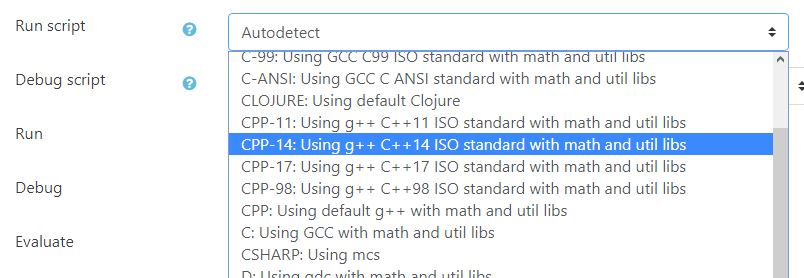
Selecting run script.
VPL 3.3.1
This release includes fixes for VPL 3.3 and support for the Safe Exam Browser.
The Safe Exam Browser (SEB) allows a controlled environment for exams. VPL activities now can require the use of SEB and/or the use of SEB with specific configuration by the “Browser Exam Key”. See https://safeexambrowser.org
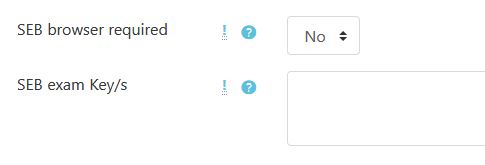
SEB configuration.
Has been fixes different bugs in the use of “group work” activities introduced in the V3.3. If you are using V3.3 and “group work” it is recommended to upgrade to V3.3.1.
VPL 3.3.0
This release includes important changes with new and improved features and bug fixes.
New and improved features 3.3.0
Syntax highlighter
The server-based syntax highlighter has been removed, now all syntax highlighting is done in the browser using the Ace editor. This change extends to more than 50 the number of programming languages supported. This improves also will reduce the CPU load on the server. It has also been developed the syntax highlighter for the test cases definition file.
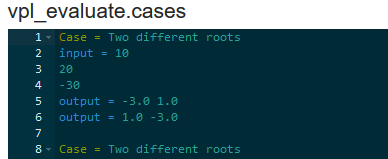
Test cases example.
Code editor
The editor has been updated using the last Ace code. This update will allow using basic autocompleting in all languages, snipes in many, and syntax checking in a few as PHP, JavaScript, and CSS.
Now it’s possible to select the editor theme in the plugin setting.
The menu has now a button to unfold and fold less used options.
Now, it is possible to delete multiple files using the new multi-delete button.
Now you can select the code font size. The size selected will be saved as a user preference.
The activity description is now shown in a “Description” tab. The student can read the activity description while writing code in one window.
The countdown timer can’t be hidden when the time left is less than five minutes.
The evaluate button now gives information about the number of automatic evaluations done and the grade reduction definition.
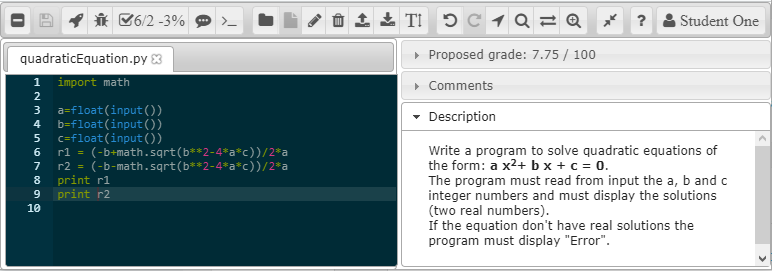
Editor(IDE) example.
Default evaluation program
The default evaluation program has been improved, trying to accomplish the common requests of the users of VPL. The new instructions are:
Fail message. This instruction sets the text to show when the case fails. The input and output information is omitted.
Program to run: This instruction allows to replace, for this case, the student’s program for another one. For example, you can use this instruction to run a static/dynamic analysis of the student code.
Program arguments. This instruction allows sending information to the student program (or “program to run”) as command-line arguments. Notice that this instruction can be used with the input instruction.
Expected exit code. This instruction set the expected exit code of the program case execution. The test case is passed if the exit code match. Notice that the test case can also be passed if an output match.
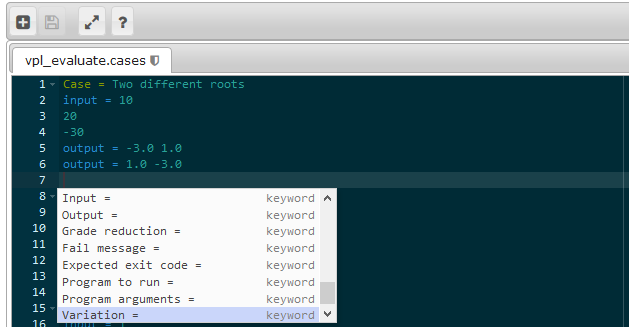
Test cases autocompletion.
Reducing grading marks by the number of automatic evaluations
The grading system has been enhanced with a penalization by automatic evaluation requests. The number of free evaluations can also be configured. Once the student uses free evaluations, the grading system will start to reduce its current mark. The reduction value can be a fixed number or a percent. Every new evaluation will apply a further reduction to the current grade. These reductions are applied to manual and automatic assessment.
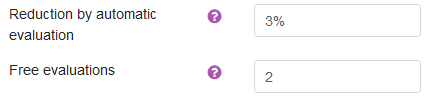
Grade reduction setting.
Group/team VPL activities redesigned
The pre v3.3 design of team’s activities has a different drawback that need to be resolved. The main problem is that if you change a student group after submissions, the submissions may be moved to another group with the student. In the new design, the submissions belong to the group and not to a student. Now it is safe to remove or add students to a group at any moment, and the submissions will remain in the group. The grade is assigned to the members of the group at the moment of been graded.
Check execution servers changes
Check execution servers now show the actual servers, including the locals and based on ones. The report now also shows the list of current processes running in the course.
Diff files changes
The diff files code has been rewritten to support the Ace editor as the way to show files side by side.
Download submissions changes
The “download submissions” button has been moved to the “submission list” report. It has been added a new button to download all submissions, including old versions. The zip file format has changed to give more information, including the full name of the student, time of submission, and evaluation details.

Buttons for download submissions.
Reducing the size of space used by submission
Due to how the submitted files are managed: created or deleted but not modified, this version includes the reuse of files of the previous submission. This is achieved by reusing (linking) files of the last submission with the same contents as new ones.
Testing VPL 3.3.0
VPL is now tested using travis-ci. The tests include PHP Lint, PHP Mess Detector, Moodle Code Checker, CSS Lint, JSHint, PHPUnit tests, and specific tests for the default Student’s program tester. These tests alone do not correct bugs in the code but are a first step to detect them.

VPL test passed.
Translations 3.3.0
Has been added the Brazilian translation thanks to Gabriel P. Silva UFRJ
Bug fixes 3.3.0
Adds timemodified field for compatibility with Moodle.
Fixes drop and paste problems.
Uses own copy of Jquery and Jquery-UI, this removes version problems.
Fixes issues reordering files.
Removes for students view the hints of grade reduction at the end of titles line of grader comments. The students could see clues in HTML before JavaScript processes it.
Fixes the problem that avoid saving new submissions when the name of requested files is changed.
Has been modified the table vpl_jailservers to remove the key of the server URL. This key with a field of 255 chars generates an error than abort the installation of VPL due to problems for reaching the limits of key size in MySQL with some charsets.
Updating VPL 3.3.0
If VPL is updated, it is highly recommended to clean the browser’s cache. The cache can mix JavaScript files from the previous version and generate errors for a while.
Important
If you update or restore activities to VPL 3.3 or higher from a previous version and this action include teams’ activities with submissions, you need to go to the list of “Virtual Programming Lab” activities and click on the “Check all” button (at the bottom of the report). This process will assign groups to the submissions.

Button for check all.